
When the first bent part measures clean and the twentieth does not, the problem is rarely “the backgauge moved.” More often, the setup locked a number without locking the full condition that number depends on—flange datum, finger contact, material batch, tooling state, and bend sequence. This guide explains how to set up a press brake backgauge so flange length and bend quality stay repeatable from first article through production, and how to tell whether drift is coming from the gauge or from somewhere else in the process.
When “Good First Article” Stops Being Repeatable
A common shop-floor pattern looks like this: the operator programs the X values, runs a test bend, checks the flange, and releases the job. Parts 1–10 look consistent. By part 30 or part 200, flange length shifts by a few tenths of a millimeter, the bend line walks, or angle opens up even though nobody touched the backgauge.
That failure mode costs more than scrap. It forces sorting, rework, late shipments, and avoidable arguments over “who changed the program.” Repeatable bending is not a property of a single setting. It is the result of a controlled process in which the backgauge, the tooling, the material, and the inspection loop all agree on the same reference.
Two symptom patterns matter before any repair starts:
- Systematic offset — every part is wrong in the same direction and roughly the same amount (for example, all flanges +0.4 mm long). That usually points to program, datum, or calibration error.
- Random scatter — parts drift around the target with no clean pattern. That usually points to seating, material variation, backlash, or inconsistent handling.
What the Backgauge Actually Controls — and What It Does Not
A press brake backgauge is a positioning system. It places the workpiece edge against a programmed reference so the bend line sits at the correct distance from that edge—typically the flange length. Modern CNC gauges can repeat that position to very tight machine tolerances, often quoted around ±0.01–0.05 mm depending on the machine class.
That machine figure is not the same as finished-part repeatability. The gauge controls where the blank sits. It does not by itself control springback, punch penetration, V-die wear, sheet thickness, or how flat the blank sits against the finger faces. Treat “gauge accuracy” and “part accuracy” as related but separate questions.
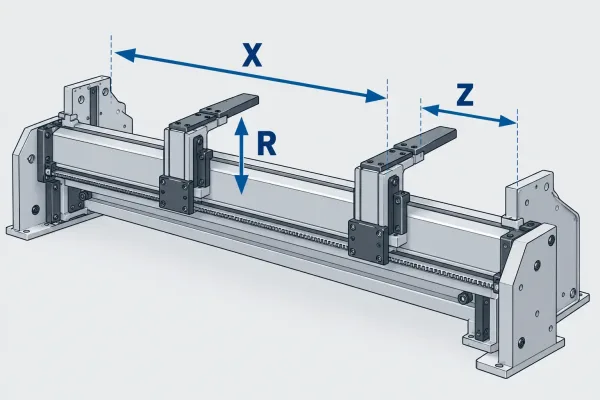
X, R, and Z in production setup
Left: every flange off by the same amount (systematic). Right: flanges drift around target (random).
For setup work, the axes are practical, not theoretical:
- X (front–back) — primary flange-length control. This is the number most programs spend time on.
- R (up–down) — finger height. Wrong R is a classic source of crash risk and unstable gauging on multi-bend parts or when a formed flange must clear the fingers.
- Z1/Z2 (lateral) — finger spacing along the beam. Uneven Z on long parts encourages sag and end-to-end flange error.
You do not need six-axis hardware to get repeatable brackets. You need the axes you have set, verified, and used consistently.
Angle, springback, tooling, and the gauge
Bend angle is formed by punch depth, die opening, material properties, and tonnage—then modified by springback. The backgauge only keeps the bend location stable. If angle varies while flange length holds, investigate crowning, Y-depth, tooling wear, or material batch before re-zeroing the gauge. If flange length varies while angle holds, start with datum, finger contact, and program values.
From Drawing to Backgauge: Build the Datum Chain First
Bad numbers on a good machine still produce bad parts. Before anyone adjusts the gauge, confirm which drawing dimensions belong on the brake and how they become X values.
Which dimensions belong on the brake
On a typical sheet metal part, the brake is responsible for:
- flange lengths that define external interfaces or hole-to-edge relationships formed after cutting;
- bend order, when later bends reference earlier flanges;
- inside bend locations that cannot be fixed later by welding or assembly.
Dimensions that are better controlled by laser cut, machining, or assembly should not be forced into tight backgauge tolerances “just in case.” Over-specifying the brake increases setup time without improving the finished assembly.
Turning flange length into an X value
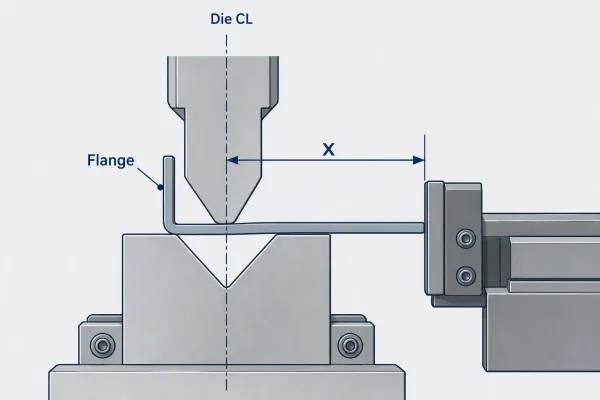
X is measured from the die centerline to the stop finger face, not from the operator’s side of the blank.
The programmed X distance is measured from the die centerline (or the machine’s defined gauge datum) to the stop finger face—not casually from the operator’s side of the blank. In practice:
- Identify the finished flange length from the drawing.
- Apply the shop’s bend allowance or bend deduction method so the flat blank and the gauge position agree.
- Confirm which face of the finger contacts the blank (usually the same edge used on the flat pattern).
- Lock the bend sequence so later flanges are gauged from a stable earlier feature.
A short review of blank size, K-factor or deduction, and bend order at the drawing stage prevents most “the gauge says it’s right” disputes later.
Backgauge Setup Sequence That Supports Repeatability
Use a deliberate sequence. Skipping steps is how shops get a first article that “works” and a batch that does not.
Before you touch the controller
- Read the current revision of the drawing and the bend program together.
- Confirm punch and die are the ones the program assumes (opening, radius, shoulder condition).
- Clean die seats, finger faces, and gauge rails. Chips and oil film change seating and can move a zero.
- Check that stop fingers are tight and not worn rounded on the gauging face.
Zero, parallel, and finger contact
- Re-home / re-zero the gauge after any collision, tooling change that alters die height, or evidence of drift.
- Verify parallelism of the finger bar to the die centerline across the working width. Use a caliper or dial setup at both ends; taper is a process defect waiting to appear on long parts.
- Confirm contact — the blank must sit flat on the die and full-face against the finger. Partial contact, a burr, or a warped blank invalidates the X value even when the readout is perfect.
- On multi-station work, set Z spacing so support is even. Two fingers close together on a long part let the center sag and the ends gauge short or long.
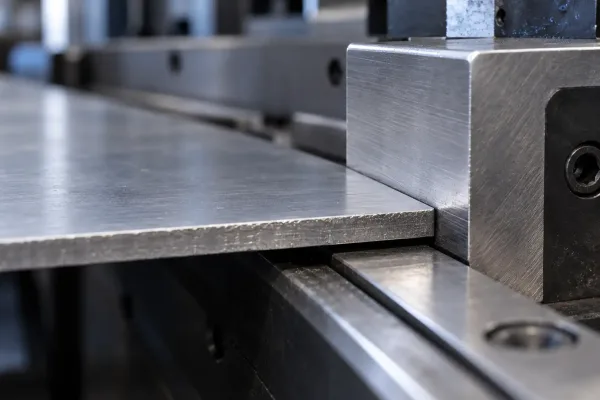
Full-face contact between blank edge and finger; burrs or oil film break this seating.
Program values that survive a multi-bend sequence
- Enter flange lengths in bend order, not flat-pattern order alone.
- Use retraction (pull-back) where the control supports it so the rising blank does not drag against the fingers mid-bend.
- Plan R height so previously formed flanges clear the fingers between steps.
- Store the accepted program and first-off measurements with the job traveler. “The operator remembers” is not a control plan.
Why the Gauge Has Not Moved but the Parts Have
This is the question that wastes the most time. If the readout is unchanged and dimensions still move, work through the process outside the gauge first.
Systematic offset vs random scatter
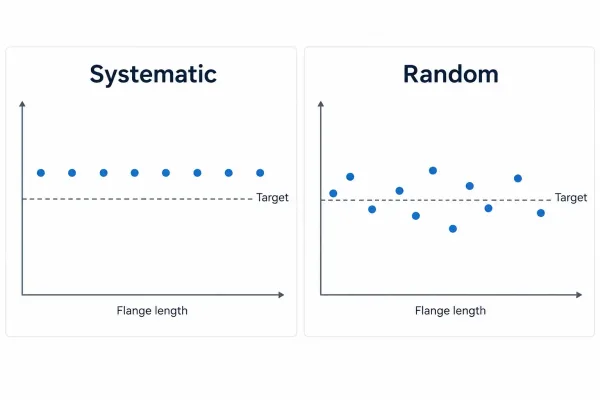
Left: every flange off by the same amount (systematic). Right: flanges drift around target (random).
| Pattern | Likely sources | First checks |
|---|---|---|
| Every part off by the same amount | Wrong X in program, wrong deduction, datum shifted after collision, finger bar moved | Program vs drawing, re-measure gauge to die center, re-zero |
| Error grows along the part length | Finger bar not parallel, uneven Z support, blank sag | Parallelism at both ends, add/adjust fingers |
| Error jumps part to part | Seating, thickness variation, backlash, inconsistent handling | Finger face condition, material certs/thickness, manual pull test on gauge |
| Angle wrong, flange length OK | Springback, Y-depth, tooling wear, crowning | Tool radius, material batch, angle compensation—not backgauge X |
Material, tooling, and seating variables
- Material thickness and temper — even within a mill certificate range, springback and blank flatness change. Mixed heats in one batch are a frequent hidden variable.
- Tooling wear — a rounded punch tip or polished die shoulder changes how the bend forms and how the blank walks into the fingers.
- Seating — oil, burrs from cutting, or a slight bow in the blank break full contact. The gauge still “holds position”; the part no longer references the same edge.
- Backlash or loose hardware — worn ball nuts, loose couplings, or a slipping finger clamp show up as random scatter even when the CNC believes it is in position.
First Article, In-Process Checks, and When to Re-Setup
Repeatability is proven by measurement over time, not by a clean first piece on the screen.
What “setup accepted” means
Call the setup accepted only when you can state, in numbers:
- critical flange length(s) and their tolerance (for example, 42.0 ±0.2 mm);
- angle requirement if the drawing controls it;
- sample size for first-off (commonly 1–3 parts) and what was measured;
- the in-process check interval.
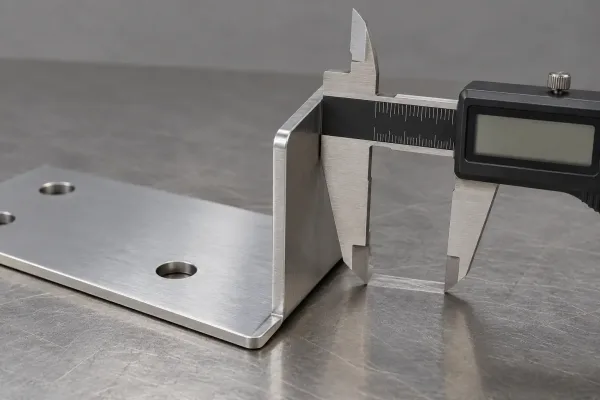
First-article check of flange length before production release.
A practical production habit is to measure critical flanges at first-off, then at a defined cadence—every 20–50 parts for stable jobs, tighter for thin material, long flanges, or multi-bend boxes. Record the values. Trends catch drift before the batch is scrap.
Triggers that require a new first-off
Run a new first article and re-verify the gauge when any of these change:
- material heat, thickness grade, or supplier;
- punch or die replacement, regrind, or height change;
- program revision, bend order change, or new flat pattern;
- collision, hard stop, or evidence of finger movement;
- shift change on jobs with tight tolerances, until process capability is demonstrated.
If the first article is re-accepted without checking whether the cause of the previous drift was removed, the same defect will return.
Practical Recommendations Before the Next Bend Job
For engineers and buyers preparing parts that must bend consistently:
- Put critical flanges and bend order on the drawing; avoid forcing every dimension into the brake.
- Agree on bend deduction method and gauge datum with the fabricator at RFQ—not after the first reject.
- Ask for first-off measurements on critical dimensions when the order matters functionally.
- Treat backgauge setup as one link in a chain that includes material certificates, tooling state, and inspection frequency.
- When a supplier reports “gauge is fine” but parts move, request the pattern data (systematic vs random) before approving a process change.
Clear drawings and an explicit setup acceptance rule reduce back-and-forth more reliably than adding notes after production starts. If a part family depends on tight flange control, a short design-for-manufacturing review before release is usually cheaper than sorting bent parts later.